> ## Documentation Index
> Fetch the complete documentation index at: https://docs-preprod.sambanova.ai/docs/llms.txt
> Use this file to discover all available pages before exploring further.
# Make
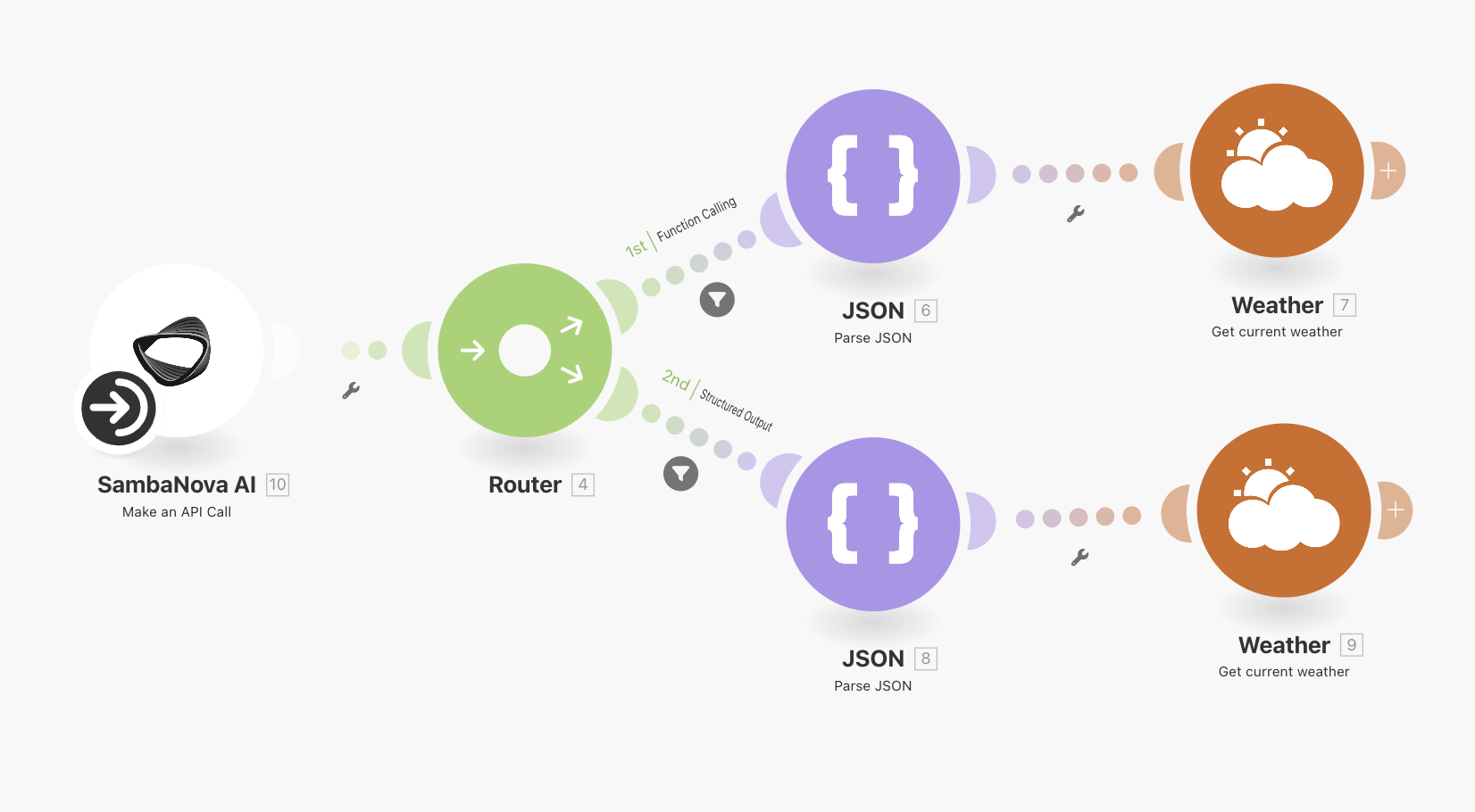
Make is a no-code workflow automation platform that lets you connect over 2,700 apps—including Slack, Google Drive, JIRA, and AWS S3—into automated workflows. With SambaNova’s high-speed LLM inference engine integrated into Make, you can easily bring Generative AI into your workflows without writing a single line of code.
## Prerequisites
To get started, ensure you have access to the following:
### SambaNova endpoint
You can connect to SambaNova using one of the following options:
* SambaCloud (Free account)
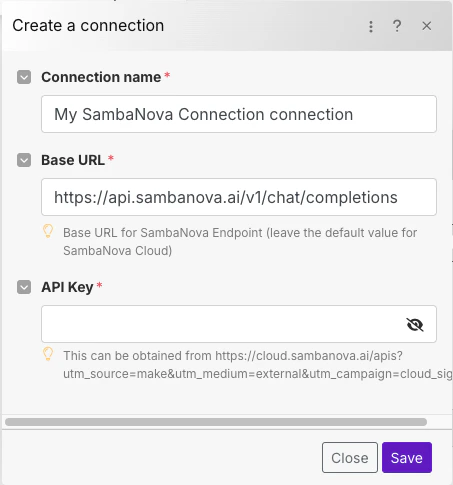
* Base URL: `https://api.sambanova.ai/v1/chat/completions`
* API key: [Available in your dashboard](https://cloud.sambanova.ai)
* SambaStack (Dedicated deployment)
* Base URL and API key: Provided by your SambaNova contact.
### Make account
Sign up for a free [Make account](https://www.make.com/) to build and manage automated workflows.
## Video walkthrough
## SambaNova modules
The SambaNova AI app in Make provides three modules that you can use in your scenarios, alongside any of the 2700+ available Make integrations.
1. List cloud models
2. Create chat completion
3. Make an API call
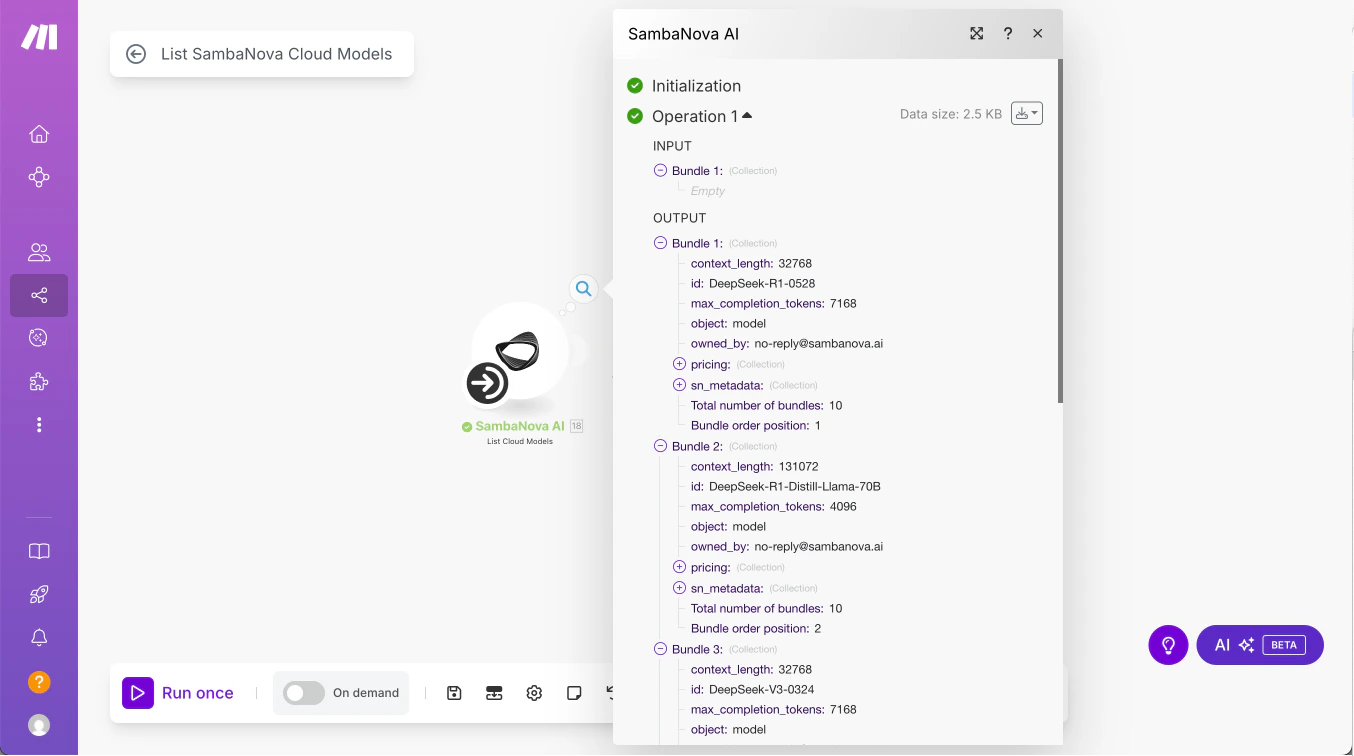
### List cloud models
This module sends a request to `https://api.sambanova.ai/v1/models` to retrieve the most up-to-date list of models available on SambaCloud.
#### Usage
SambaNova frequently updates its model offerings. This module helps you dynamically pull the current list of supported models, ensuring that your workflows don’t rely on outdated or deprecated models.
#### Functionality
* No authentication or configuration is needed.
* The module outputs an array of model metadata as a Make bundle.
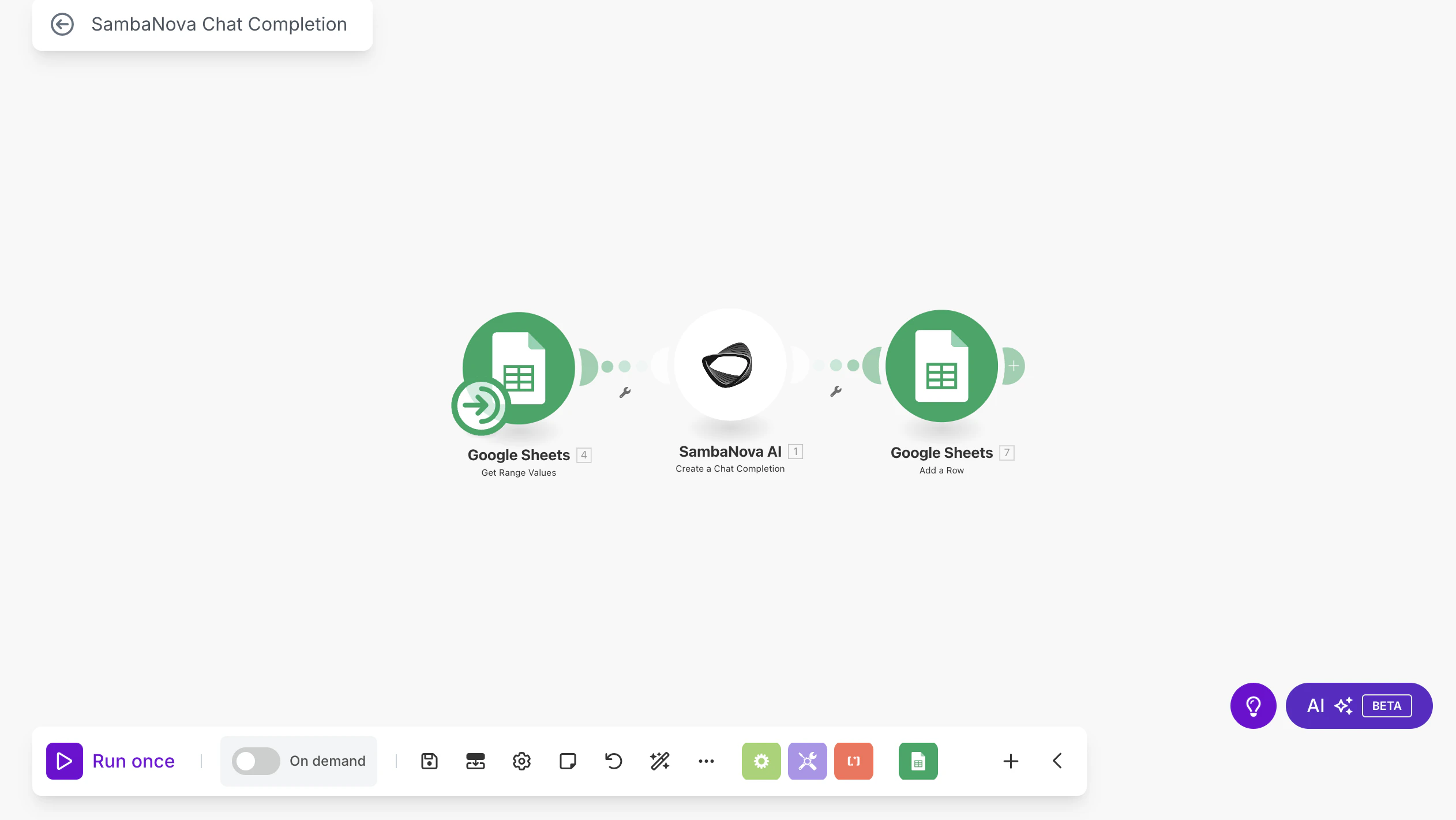
### Create chat completion
This module sends a prompt (including system and user messages) to the SambaNova API and returns a chat-based response.
#### Usage
Chat completions power a wide range of GenAI use cases—from chatbots to code assistants and content generation. This module lets you use SambaNova’s endpoints for these tasks with industry-leading speeds.
#### Functionality
* Add the module to your Make scenario and open its configuration panel.
* Create a SambaNova Connection using your base URL and API key, as described in the [Prerequisites](#prerequisites) section above.
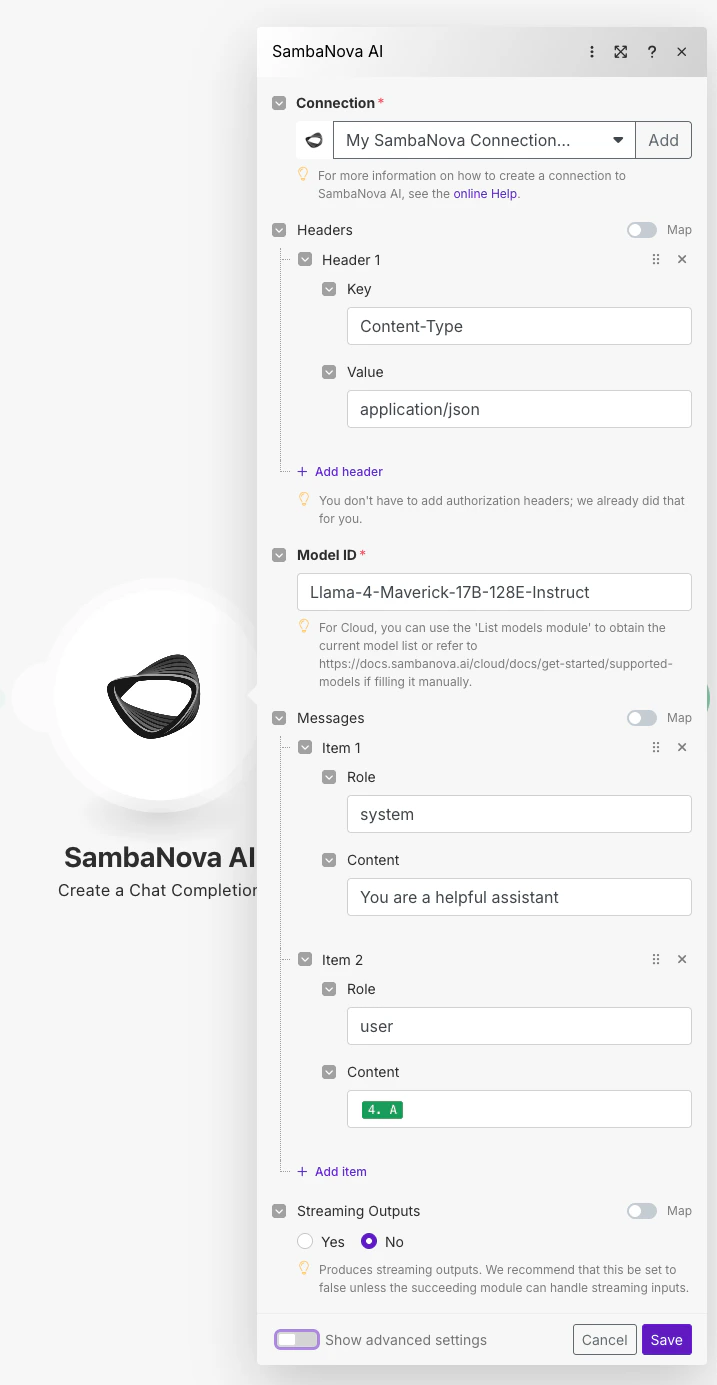
* Leave default headers as-is and select a Model ID.
* For SambaCloud, use the List Cloud Models module.
* For SambaStack, contact your SambaNova representative.
* The `messages` field contains prompts for different roles (`system`, `user`, etc.) and is mappable, meaning you can populate it dynamically from previous modules (e.g., a Slack or Facebook module) instead of entering it manually.
* Click **Show advanced settings** to view and adjust generation parameters like:
* `temperature`
* `top_p`
* `top_k`
* `stop sequences`
* Connect the module with other Make modules in your workflow and run your scenario.
### Make an API Call
This module makes an authorized API call to SambaNova with an arbitrary request body.
#### Usage
If your application requires access to advanced functionality outside the chat completions framework, this module is your go-to. It supports all endpoints described in the SambaNova documentation, including:
* Function calling
* Structured outputs
* Voice transcription/translation
* Image understanding
You just need to specify the appropriate request headers and body as described in our API reference.
#### Functionality
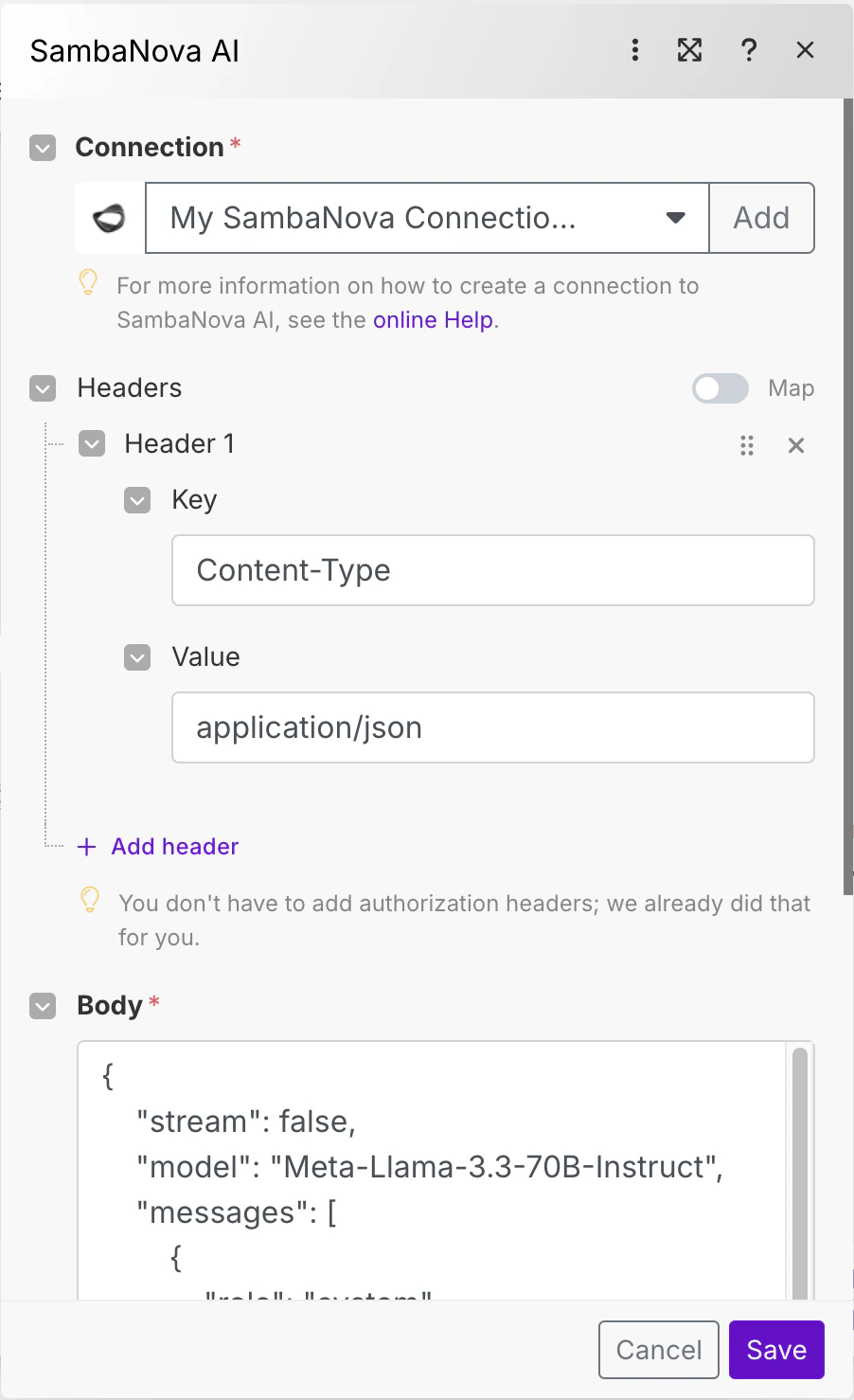
* Add the module to your Make scenario and open its configuration.
* Add a SambaNova connection using the base URL and key as described in the [Prerequisites](#prerequisites) section above.
* Configure the module with the request headers and body. All fields are mappable, so you can populate them dynamically from preceding modules.
* Connect the module with other Make modules in your workflow and run your scenario!
 ### Create chat completion
This module sends a prompt (including system and user messages) to the SambaNova API and returns a chat-based response.
#### Usage
Chat completions power a wide range of GenAI use cases—from chatbots to code assistants and content generation. This module lets you use SambaNova’s endpoints for these tasks with industry-leading speeds.
#### Functionality
* Add the module to your Make scenario and open its configuration panel.
* Create a SambaNova Connection using your base URL and API key, as described in the [Prerequisites](#prerequisites) section above.
### Create chat completion
This module sends a prompt (including system and user messages) to the SambaNova API and returns a chat-based response.
#### Usage
Chat completions power a wide range of GenAI use cases—from chatbots to code assistants and content generation. This module lets you use SambaNova’s endpoints for these tasks with industry-leading speeds.
#### Functionality
* Add the module to your Make scenario and open its configuration panel.
* Create a SambaNova Connection using your base URL and API key, as described in the [Prerequisites](#prerequisites) section above.
 * Leave default headers as-is and select a Model ID.
* For SambaCloud, use the List Cloud Models module.
* For SambaStack, contact your SambaNova representative.
* The `messages` field contains prompts for different roles (`system`, `user`, etc.) and is mappable, meaning you can populate it dynamically from previous modules (e.g., a Slack or Facebook module) instead of entering it manually.
* Leave default headers as-is and select a Model ID.
* For SambaCloud, use the List Cloud Models module.
* For SambaStack, contact your SambaNova representative.
* The `messages` field contains prompts for different roles (`system`, `user`, etc.) and is mappable, meaning you can populate it dynamically from previous modules (e.g., a Slack or Facebook module) instead of entering it manually.
 * Click **Show advanced settings** to view and adjust generation parameters like:
* `temperature`
* `top_p`
* `top_k`
* `stop sequences`
* Connect the module with other Make modules in your workflow and run your scenario.
* Click **Show advanced settings** to view and adjust generation parameters like:
* `temperature`
* `top_p`
* `top_k`
* `stop sequences`
* Connect the module with other Make modules in your workflow and run your scenario.
 ### Make an API Call
This module makes an authorized API call to SambaNova with an arbitrary request body.
#### Usage
If your application requires access to advanced functionality outside the chat completions framework, this module is your go-to. It supports all endpoints described in the SambaNova documentation, including:
* Function calling
* Structured outputs
* Voice transcription/translation
* Image understanding
You just need to specify the appropriate request headers and body as described in our API reference.
#### Functionality
* Add the module to your Make scenario and open its configuration.
* Add a SambaNova connection using the base URL and key as described in the [Prerequisites](#prerequisites) section above.
* Configure the module with the request headers and body. All fields are mappable, so you can populate them dynamically from preceding modules.
### Make an API Call
This module makes an authorized API call to SambaNova with an arbitrary request body.
#### Usage
If your application requires access to advanced functionality outside the chat completions framework, this module is your go-to. It supports all endpoints described in the SambaNova documentation, including:
* Function calling
* Structured outputs
* Voice transcription/translation
* Image understanding
You just need to specify the appropriate request headers and body as described in our API reference.
#### Functionality
* Add the module to your Make scenario and open its configuration.
* Add a SambaNova connection using the base URL and key as described in the [Prerequisites](#prerequisites) section above.
* Configure the module with the request headers and body. All fields are mappable, so you can populate them dynamically from preceding modules.
 * Connect the module with other Make modules in your workflow and run your scenario!